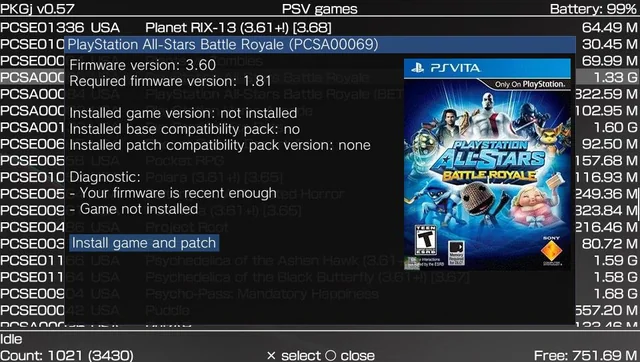
PKGj continues to be one of the most popular homebrew tools for the PlayStation Vita, offering users the ability to search, download, and install Vita games, updates, DLC, PSP content, and PS1 classics directly on the console. Despite its convenience, many users in 2026 report persistent issues with downloads failing to start, getting stuck at 0%, completing but refusing to install, or DLC content not appearing or functioning after installation.
This comprehensive guide examines the root causes of these problems and provides clear, actionable solutions to help you restore full functionality to PKGj.
Understanding PKGj Download Failures
PKGj works by connecting to public databases such as NoPayStation, downloading official Sony package files over Wi-Fi, and installing them using license spoofing plugins like NoNpDrm. The entire process depends on a delicate balance of custom firmware, plugins, storage configuration, and network compatibility. When any component is misconfigured or outdated, downloads can fail at various stages.
The most common triggers include outdated databases, missing essential plugins, storage mounting errors with SD2Vita adapters, network compatibility problems with modern servers, and insufficient free space. DLC titles are particularly prone to issues because they often require the base game to be installed first, along with exact region matching and additional license handling.
Understanding these underlying mechanics is the first step toward effective troubleshooting. Most problems are not caused by the app itself but by the surrounding environment on the modded Vita.
Common Reasons for Download Issues
Several recurring factors typically prevent PKGj from downloading or installing content correctly. These include outdated or corrupted database files that break download links, missing or improperly installed plugins such as NoNpDrm, 0syscall6, ReF00D, and iTLS-Enso, and storage-related conflicts when using SD2Vita with YAMT or StorageMgr. Network issues frequently cause downloads to stall at 0% due to the Vita’s aging Wi-Fi hardware struggling with current TLS requirements. Additionally, corrupted partial downloads, incorrect config.txt settings, firmware incompatibilities, and insufficient storage space often compound the problem.
DLC downloads face extra challenges because they depend heavily on having the correct base game already installed and properly licensed on the system.
Step-by-Step Troubleshooting Guide
Step 1: Refresh and Update the Database Launch PKGj and press the Triangle button to access the menu. Select the Refresh or Update Database option and allow it to complete fully. This single action resolves the majority of cases where games or DLC do not appear or fail to download.
Step 2: Verify and Update All Required Plugins Open AutoPlugin2 and ensure the following plugins are installed and enabled: NoNpDrm, 0syscall6, ReF00D, and iTLS-Enso. Restart your Vita after making changes. Outdated or missing plugins are among the leading causes of installation failures after a download completes.
Step 3: Check Storage and Clear Corrupted Files Confirm that ux0: is correctly mounted to your SD card. Delete the contents of the ux0:pkgj folder (except config.txt and database files) to remove any corrupted partial downloads. Ensure you have at least 3-4 GB of free space before attempting large titles.
Step 4: Fix Configuration and Network Settings In VitaShell, verify that the config.txt file in ux0:pkgj contains the correct database URLs and download paths. Switch to a strong 2.4 GHz Wi-Fi network and consider temporarily adjusting iTLS-Enso settings if connection errors persist.
Step 5: Reinstall the Latest Version of PKGj Download the most recent release from the official GitHub repository and perform a clean installation. Newer versions frequently include fixes for download stability and compatibility with updated servers.
Step 6: Address DLC-Specific Problems Always install the base game before attempting its DLC. After installing the base game, refresh the PKGj database again. For stubborn DLC titles, try manual installation of the .pkg file through VitaShell.
Best Practices to Prevent Future Issues
- Keep PKGj, AutoPlugin2, and all kernel plugins updated regularly.
- Maintain regular backups of your ux0:pkgj folder and save data.
- Use only official sources for downloads to avoid corrupted files.
- Monitor available storage space proactively, especially when downloading large Vita titles.
- Consider using a secondary microSD card for testing new configurations.
Following these practices significantly reduces the likelihood of recurring download problems.
Advanced Solutions for Persistent Cases
If the standard troubleshooting steps do not resolve the issue, consider reinstalling custom firmware on firmware 3.65 with Enso for greater long-term stability. Alternatively, users can fall back to downloading problematic packages via NPS Browser on a PC and transferring them manually through VitaShell. Manually replacing the TSV database files from NoPayStation is another effective advanced technique.
In rare cases, reconfiguring the plugin load order in tai/config.txt or performing a full storage database rebuild in Safe Mode can eliminate deep-rooted conflicts.
Conclusion
Most PKGj download and installation failures in 2026 stem from preventable issues related to databases, plugins, storage configuration, and network compatibility. By methodically applying the troubleshooting steps outlined in this guide, the vast majority of users can restore full functionality and enjoy seamless downloads once again.