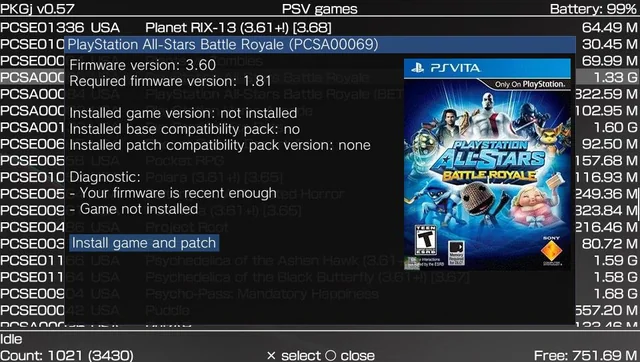
PKGj (sometimes stylized as PKG J) is a popular homebrew application for the PlayStation Vita (and PS TV) that allows users to download and install .pkg files such as games, updates, DLC, PSP titles, and PS1 classics—directly on the device without needing a PC. It is a fork of the earlier pkgi project and is widely used in the Vita modding community.
While it is a powerful and convenient tool, the question of its safety has multiple layers: technical security, account risks, legal implications, and device stability. Here’s a balanced breakdown.
What Is PKGj and How Does It Work?
PKGj connects to public databases (often based on NoPayStation) to list and download official Sony package files. It then unpacks them on-device and pairs them with fake licenses (via plugins like NoNpDrm or NoPsmDrm). This eliminates the need for transferring files from a computer.
Key features include:
- Search, filter, and sort available content.
- Direct download and installation (including bubbles in LiveArea).
- Support for PS Vita, PSP, PS1, and DLC content.
- Standalone operation on the Vita.
It requires a jailbroken Vita with custom firmware (e.g., via HENkaku/Enso) and “unsafe mode” enabled.
Technical Safety: Is the App Itself Safe?
From trusted sources, yes.
- The primary repository is on GitHub (blastrock/pkgj), an active and community-vetted project with no widespread reports of malware in the official VPK.
- Always download from the official GitHub releases page or trusted homebrew portals like VitaDB.
- Scan the VPK with antivirus software before transferring to your Vita (though Vita homebrew itself runs in a sandboxed environment).
Risks to watch for:
- Unofficial or mirrored versions could be tampered with. Stick to official sources.
- The databases it uses point to legitimate Sony servers or mirrors for .pkg files. The risk of downloading a modified/malicious package is low but not zero if using unverified sources.
- No major malware incidents tied specifically to PKGj have been reported in community forums like Reddit’s r/VitaPiracy or GBAtemp.
Account and Ban Risks
This is where “safety” becomes more nuanced:
- PSN Account Risk: Using pirated content carries a risk of ban, though the Vita scene has historically been lenient compared to PS4/PS5. Many users report long-term use (including with main accounts) without issues, especially if avoiding obvious behaviors like sharing modified content. Using a secondary/throwaway PSN account is a common recommendation.
- Online Play: Playing PKGj-installed games online (especially with mismatched regions or DLC) increases detection risk. The Vita does send some data to Sony servers.
- ISP/ISP Monitoring: Downloads often mimic legitimate PSN traffic (direct to Sony servers for many titles), so they are generally not flagged like torrents. No widespread ISP trouble reported specifically for PKGj.
Bottom line on bans: Low for casual offline use, but never zero. Sony has largely moved on from the Vita, but they can still act on accounts.
Legal and Ethical Considerations
PKGj itself is legal homebrew, but it is frequently used to download copyrighted games without owning them. This constitutes piracy in most jurisdictions, which can lead to legal consequences (fines, etc.), though enforcement against individual Vita users is extremely rare.
The developers do not condone piracy.
Device Stability and Other Risks
- Bricking: Proper installation is safe, but jailbreaking the Vita itself carries a small risk of bricking (though modern guides are very reliable).
- Storage Issues: Large downloads can fill memory cards quickly; use SD2Vita for expanded storage.
- Compatibility: Some games may require additional plugins (e.g., via AutoPlugin2) to run properly. Errors like failed installs are common but usually fixable.
- Updates: Keep PKGj and your databases updated for the best experience and security.
Best Practices for Safer Use
- Use the official GitHub release.
- Install on a secondary account if possible.
- Avoid signing into PSN while using questionable content.
- Backup your Vita (saves, bubbles, etc.) regularly.
- Use only trusted databases.
- Consider a VPN for extra privacy (though often unnecessary for PKGj).
- Stay offline for maximum safety when playing backups.
Verdict: Is PKGj Safe?
Technically safe to install if sourced correctly and used responsibly. It is a well-regarded, stable homebrew with thousands of users and no systemic security issues.
However, “safe” depends on your risk tolerance:
- Low risk for offline play with backups of games you own or public domain titles.
- Moderate risk for account bans and legal gray areas if downloading full commercial libraries.
- High convenience makes it one of the best tools in the Vita scene.
If you’re primarily interested in preservation, homebrew apps, or legitimately owned digital titles, PKGj (combined with proper plugins) is an excellent addition to a modded Vita. Always weigh the benefits against the potential downsides, and proceed responsibly.
Conclusion
In summary, PKGj is technically safe to install and use when downloaded from official sources like its GitHub repository. It is a stable, well-maintained homebrew tool that has earned the trust of the PlayStation Vita community.
However, its safety ultimately depends on how you use it. The app itself poses minimal security risk, but downloading and installing copyrighted content carries legal and account ban risks. For users who practice responsible modding — preferably with a secondary account, offline gameplay, and backups — PKGj remains one of the most convenient and powerful tools available for the Vita.