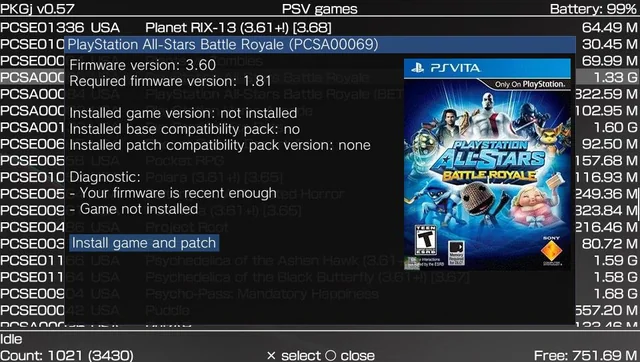
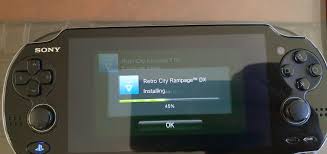
PKGj stands as one of the most essential and powerful homebrew applications available for the PlayStation Vita and PlayStation TV. This versatile tool enables users to search, download, and install package (.pkg) files directly on the device, eliminating the need for a computer during the process. As a modern fork of the original PKGi project, PKGj supports a wide range of content, including native PS Vita games, updates, DLC, PSP titles, PS1 classics, and more. Its standalone functionality, user-friendly interface, and regular community support have made it a cornerstone of the Vita modding scene.
Whether you aim to expand your game library for preservation purposes, enjoy legacy titles, or streamline content management on a modded console, mastering PKGj installation and setup proves invaluable. This detailed guide walks you through every aspect — from prerequisites and installation methods to advanced configuration, troubleshooting, best practices, and important safety considerations — ensuring a smooth and secure experience in 2026.
Understanding PKGj: Features and Benefits
PKGj revolutionizes how Vita owners interact with digital content. Unlike traditional methods that require transferring files via USB or FTP from a PC, PKGj connects to public databases (primarily powered by NoPayStation and similar repositories) to fetch official Sony package files directly over Wi-Fi. It then installs them on-device, complete with compatible license spoofing when paired with essential plugins.
Key features include:
- Direct on-device downloads and installation — No PC required for most operations.
- Comprehensive content support — PS Vita games, PSP (via Adrenaline), PS1 classics, DLC, updates, and themes.
- Advanced filtering and search — Sort by title, size, region, or category; powerful search functionality.
- Queue management — Download multiple items efficiently.
- Database customization — Support for custom TSV files and repositories.
- Lightweight and stable — Minimal system resource usage with regular updates from the developer community.
By installing PKGj, users gain unprecedented convenience. However, success depends heavily on proper system preparation and supporting software.
Essential Prerequisites Before Installation
Installing PKGj requires a properly modded PlayStation Vita. Attempting installation on an unmodified console will fail, as the application relies on custom firmware capabilities.
Core Requirements:
- Custom Firmware (CFW): Your Vita must run HENkaku/Enso (for permanent custom firmware) or a compatible equivalent. Firmware version 3.65 or 3.74 is typically recommended for stability.
- Unsafe Homebrew Mode: Enable this in Settings > HENkaku > Unsafe Homebrew. PKGj needs elevated permissions for package handling.
- VitaShell: The essential file manager for transferring VPK files and general system navigation.
- Storage Solution: Official Sony memory cards are limited in size. Most users install an SD2Vita adapter with a high-capacity microSD card (128GB or larger) formatted correctly using YAMT or StorageMgr.
- Stable Internet Connection: Required for downloading databases and content. Consider using iTLS-Enso for improved SSL/TLS compatibility with modern servers.
- Supporting Plugins: NoNpDrm (or NoNpDrm + ReF00D), 0syscall6, and others installed via AutoPlugin2 for maximum compatibility.
Recommended Preparation Steps:
- Update your CFW and plugins to the latest versions.
- Back up your Vita completely (saves, apps, and system configuration) using VitaShell or dedicated backup tools.
- Ensure at least 1-2 GB of free space for the initial setup and database download.
Failing to meet these prerequisites often leads to common errors such as “Unsafe mode required” or download failures.
Installation Methods for PKGj
There are two primary ways to install PKGj in 2026. The choice depends on your preference for simplicity versus control.
Method 1: Installation via VitaDeploy (Easiest and Recommended)
VitaDeploy serves as a convenient all-in-one homebrew manager.
- Launch VitaDeploy from your LiveArea.
- Select the App Downloader (or equivalent section).
- Browse the list and locate PKGj.
- Check the box next to it and initiate the download and installation process.
- Once complete, exit and refresh your LiveArea. The PKGj bubble should appear.
This method automatically fetches a compatible version and minimizes user error. Many 2026 tutorials highlight VitaDeploy as the fastest route for beginners.
Method 2: Manual Installation via VPK File
For users preferring the latest release or offline installation:
- Launch VitaShell on your PS Vita.
- Press the Select button to open the options menu and switch to USB or FTP mode (USB is generally faster and more reliable).
- Connect your Vita to your PC. If using SD2Vita, ensure the correct storage device (ux0:) is mounted.
- Create a folder named vpk inside ux0: if it does not already exist.
- Transfer the downloaded pkgj.vpk file into the ux0:/vpk/ directory.
- Safely disconnect (press Circle in VitaShell to exit USB/FTP mode).
- Navigate to ux0:/vpk/ in VitaShell, highlight the pkgj.vpk file, and press Cross (X) to begin installation.
- Confirm the installation. Upon success, PKGj will appear as a new application bubble on your home screen.
Both methods typically take only a few minutes. Always verify the VPK file hash or download from trusted mirrors when possible to ensure file integrity.
Post-Installation Configuration and First Launch
After installation, proper setup maximizes PKGj’s potential:
- Launch PKGj for the first time. The interface may initially appear empty.
- Press the Triangle button to open the options menu.
- Select Refresh or Update Database to download the latest content listings. This process may take several minutes depending on your connection.
- Configure categories (Vita, PSP, PS1, DLC, etc.) according to your needs.
- Explore additional settings such as download path, sorting preferences, and notification options.
Essential Plugin Recommendations:
- Install AutoPlugin2 if not already present. It simplifies adding NoNpDrm, ReF00D, 0syscall6, and other compatibility modules.
- iTLS-Enso for secure connections to updated servers.
- Adrenaline for optimal PSP and PS1 content playback.
Many users also customize PKGj with cover art packs and enhanced databases for a more polished experience.
Using PKGj: Downloading and Installing Content
Once configured, usage is straightforward:
- Use the search function or browse categories.
- Select desired content and press X to queue for download.
- Monitor progress and install automatically upon completion.
- For multiple items, utilize the queue system.
Downloads pull from official Sony servers where possible, making them relatively discreet compared to torrent-based methods.
Troubleshooting Common Issues
Even with careful preparation, users may encounter challenges:
- Empty Database: Refresh multiple times or manually download a fresh TSV file.
- Download Errors / 0% Progress: Check internet stability, update iTLS, or restart the console.
- Installation Failures: Ensure sufficient storage and correct plugins are active.
- Compatibility Problems: Specific titles may require additional patches or ReF00D configuration.
- Unsafe Mode Warnings: Double-check HENkaku settings.
- Storage Mounting Issues: Reconfigure YAMT/SD2Vita if ux0: is not accessible.
Comprehensive communities on Reddit (r/PSVitaHomebrew, r/VitaPiracy) and GBAtemp offer solutions for niche problems, with many 2026-specific fixes documented in video guides.
Advanced Tips and Best Practices
To elevate your PKGj experience:
- Regularly update both the application and databases.
- Use secondary PSN accounts for testing.
- Organize your library with custom folders and cover art.
- Combine with tools like VitaDB for additional homebrew discovery.
- Monitor storage usage proactively to avoid corruption.
- Consider offline modes for travel or when privacy is a priority.
For power users, custom config files (ux0:pkgj/config.txt) allow fine-tuning repository sources and behavior.
Legal, Security, and Ethical Considerations
While PKGj itself is legitimate homebrew developed by the community, its primary use often involves copyrighted material. The developers do not endorse piracy. Users bear full responsibility for complying with copyright laws and Sony’s terms of service in their respective regions.
Security Best Practices:
- Download exclusively from official GitHub releases.
- Keep your system and plugins updated.
- Avoid suspicious third-party mirrors.
- Maintain regular backups.
Account ban risks remain low for offline use on the Vita platform in 2026, but they are never zero. Responsible usage minimizes potential issues.
Alternatives to PKGj
While PKGj leads the category, alternatives include:
- Traditional PC-based methods using NPS Browser.
- Other homebrew downloaders with different feature sets.
- Physical cartridge collection combined with digital backups.
Most enthusiasts find PKGj offers the best balance of convenience and functionality.
Conclusion
Installing and configuring PKGj on your PlayStation Vita unlocks tremendous potential for your modded handheld. By following this comprehensive guide, you can establish a robust, efficient content management system that brings hundreds of titles to your device with minimal effort.
The process rewards careful preparation and attention to detail. Whether you are a longtime Vita enthusiast preserving gaming history or a newcomer exploring the modding scene, PKGj represents a significant upgrade to the overall experience.