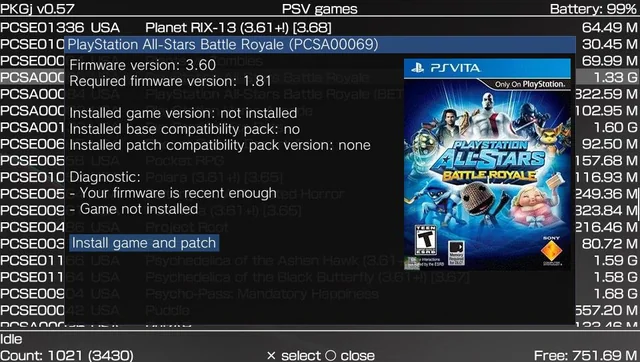

The PlayStation Vita remains one of the most loved handheld gaming consoles ever created by Sony. Even years after its official support slowed down, the PS Vita community continues to grow because of homebrew applications, custom firmware, and community-developed tools. One of the most popular applications in the Vita homebrew scene is PKGj.
Many PS Vita users hear about PKGj when searching for ways to manage downloadable content directly from their console. However, beginners often feel confused about what PKGj actually does, how it works, and whether it is safe to use. This guide explains everything in simple terms so new and experienced users can better understand the software.
Understanding PKGj
PKGj is a homebrew application designed for the PS Vita. It allows users to browse, manage, and download PlayStation content directly from the console without using the official PlayStation Store interface.
The application acts as a package manager for PS Vita systems running custom firmware. Once installed, PKGj gives users access to downloadable content categories such as:
- PS Vita games
- PSP games
- PS1 classics
- DLC content
- Themes
- Updates
PKGj became popular because it simplified content management for Vita users. Instead of manually transferring files through a PC, users could download and install content directly on the handheld device.
What Does PKGj Do?
PKGj mainly functions as a content browser and installer for the PS Vita ecosystem. It allows users to access downloadable packages directly from their handheld console.
The software organizes content into categories, making navigation simple. Users can browse available titles, view details, and install content without needing a computer for every step.
Some major functions include:
Browsing Content
Users can browse game libraries directly through the application. Categories help organize content efficiently.
Download Management
PKGj manages downloads within the Vita system. Users can monitor progress and install content automatically after downloads finish.
DLC Installation
The app supports downloadable content for many games, allowing users to install expansions and additional files.
PSP and PS1 Support
PKGj is not limited to PS Vita games. It also supports PSP and PS1 content compatible with the Vita.
Automatic Updates
Some versions of PKGj support update checking and simplified update installation.
How Does PKGj Work on PS Vita?
Many people wonder how PKGj actually operates behind the scenes. While the technical process can become complicated, the basic concept is easy to understand.
PKGj works through the Vita’s homebrew environment. It communicates with online package databases and downloads content in a format compatible with the PS Vita system.
The process generally works like this:
- The user installs custom firmware on the Vita
- Homebrew software support becomes available
- PKGj is installed as a homebrew application
- Configuration files are added
- PKGj connects to package listings
- Users browse downloadable content
- Selected files download directly to the Vita
- The system installs the files automatically
This creates a streamlined experience for users who want direct access to downloadable content management.
Why PKGj Became Popular
PKGj gained popularity for several reasons. The biggest reason is convenience.
Before tools like PKGj existed, many Vita users needed to transfer files manually using PCs, memory cards, and multiple applications. The process could feel difficult for beginners.
PKGj simplified the experience dramatically.
Easy Navigation
The application features a simple interface optimized for handheld use.
Direct Downloads
Users can download content directly on the Vita instead of transferring files from external devices.
Multiple Content Types
Support for Vita, PSP, and PS1 content made the app extremely versatile.
Active Community
The Vita modding community regularly shared tutorials, troubleshooting guides, and updates related to PKGj.
Faster Setup
Once configured correctly, the software became relatively easy to maintain.
Requirements for Using PKGj
PKGj cannot run on a completely stock PS Vita system. Certain requirements must be completed first.
A PS Vita Console
Users need a compatible PS Vita model or PlayStation TV device.
Custom Firmware
PKGj requires custom firmware or a hacked Vita environment. This enables homebrew support.
Popular firmware environments include:
- HENkaku
- Enso
- VitaShell support systems
Internet Connection
An internet connection is necessary for browsing and downloading content.
Storage Space
Users need enough memory card or internal storage space for games and downloadable content.
Configuration Files
PKGj relies on setup and configuration files to function properly.
Understanding Homebrew on PS Vita
To fully understand PKGj, users should understand the concept of homebrew software.
Homebrew refers to unofficial applications developed by independent programmers rather than the console manufacturer.
Homebrew apps can include:
- Emulators
- Media players
- Utility tools
- File managers
- Custom themes
- Package managers like PKGj
The Vita homebrew community became extremely active because the console hardware remained powerful even years after release.
Many users install homebrew software to expand their console’s functionality beyond official limitations.
Is PKGj Legal?
One of the most common questions about PKGj involves legality.
The answer depends on how the software is used and what content is accessed.
PKGj itself is generally considered a homebrew utility application. However, downloading copyrighted content without proper ownership or authorization may violate copyright laws in many regions.
Users should always understand the legal implications of modifying consoles and downloading content.
It is important to:
- Follow local laws
- Respect intellectual property rights
- Understand the risks of console modification
- Use educational resources responsibly
How to Install PKGj
The installation process varies slightly depending on firmware versions and setup methods, but the general process remains similar.
Step 1: Install Custom Firmware
The Vita must first support homebrew applications.
Step 2: Install VitaShell
VitaShell is commonly used for file management on PS Vita systems.
Step 3: Download PKGj Files
Users transfer the required application files to the Vita.
Step 4: Configure Required Files
Certain configuration files must be added correctly for PKGj to function.
Step 5: Refresh LiveArea
After installation, the application bubble appears on the Vita home screen.
Step 6: Launch PKGj
Users can open the app and begin browsing content.
PKGj User Interface Explained
PKGj uses a lightweight interface optimized for handheld controls.
Main Menu
The main screen displays content categories and available downloads.
Sorting Options
Users can sort titles by:
- Name
- Region
- Size
- Release date
Search Function
The search feature helps users quickly locate specific content.
Download Queue
Active downloads appear in the queue section.
Installed Content
Users can also track installed packages and updates.
Common PKGj Errors
Like most homebrew applications, PKGj sometimes encounters errors.
Missing Configuration File
One of the most common issues involves incorrect configuration settings.
Download Failures
Downloads may fail because of:
- Weak internet connection
- Storage issues
- Incorrect setup
Database Refresh Problems
Sometimes the application fails to refresh package listings.
Compatibility Errors
Older firmware versions may not support newer PKGj releases.
How to Fix PKGj Problems
Most PKGj problems can be fixed with basic troubleshooting steps.
Restart the Application
Simple restarts often solve temporary issues.
Check Internet Connection
Stable Wi-Fi is essential for reliable downloads.
Update Software
Keeping homebrew applications updated improves compatibility.
Verify Storage Space
Insufficient storage causes many download failures.
Reinstall Configuration Files
Incorrect setup files often create loading problems.
Benefits of Using PKGj
PKGj offers several advantages for Vita enthusiasts.
Convenience
Direct downloads simplify the overall process.
Portable Access
Everything works directly from the handheld console.
Organized Library
The application organizes downloadable content neatly.
Community Integration
The tool became deeply integrated with Vita homebrew culture.
Support for Older Content
PKGj helps users manage classic PSP and PS1 compatibility content.
Drawbacks of PKGj
Despite its popularity, PKGj also has limitations.
Requires Console Modification
Users must install custom firmware first.
Technical Knowledge Needed
Beginners may struggle with setup and troubleshooting.
Possible Stability Issues
Homebrew applications sometimes experience bugs.
Legal Concerns
Users must understand copyright responsibilities.
Limited Official Support
PKGj is community-driven rather than officially supported.
PKGj and the PS Vita Community
The Vita homebrew community played a major role in PKGj’s success.
Online forums, video tutorials, and community guides helped thousands of users learn how to configure their devices safely.
The community also contributed:
- Troubleshooting support
- Translation projects
- Plugin development
- Setup guides
- Compatibility testing
This collaboration helped extend the lifespan of the PS Vita long after mainstream support declined.
Why PS Vita Still Matters
Even years after release, the PS Vita remains important to many gamers.
Portable Gaming Experience
The Vita offers high-quality portable gaming.
Strong Indie Library
Many indie games perform exceptionally well on Vita hardware.
Homebrew Flexibility
Custom firmware transformed the Vita into a versatile handheld device.
Emulation Potential
The Vita supports various retro gaming applications.
Dedicated Fan Base
The community continues creating tools and guides.
PKGj vs Other Vita Tools
Several homebrew applications exist for the Vita ecosystem, but PKGj serves a unique role.
VitaShell
Primarily used for file management.
Adrenaline
Used for PSP emulation on Vita systems.
AutoPlugin
Simplifies plugin installation.
PKGj
Focused on downloadable content browsing and management.
Together, these applications form the foundation of many Vita homebrew setups.
Understanding Plugins and PKGj
Plugins enhance Vita functionality and sometimes improve PKGj performance.
Examples include:
- Network enhancements
- Compatibility fixes
- Storage support tools
- Performance utilities
However, incorrect plugin configurations can also create conflicts.
Users should carefully follow compatibility guides before installing multiple plugins simultaneously.
Storage Options for PKGj Users
Storage plays an important role when using PKGj.
Official Vita Memory Cards
Sony memory cards remain compatible but can be expensive.
SD2Vita Adapters
Many users prefer SD2Vita adapters because they support microSD cards.
Internal Storage
Some Vita models support limited internal storage.
Storage Management Tips
Users should:
- Organize installed content
- Remove unused files
- Monitor available space regularly
Internet Requirements for PKGj
A stable internet connection improves the PKGj experience significantly.
Faster Downloads
Better internet speeds reduce installation time.
Stable Connections Prevent Errors
Interrupted downloads may require restarting.
Wi-Fi Recommendations
Strong wireless signals help maintain reliable performance.
PKGj Updates and Maintenance
Like most software, PKGj occasionally receives updates.
Updates may include:
- Bug fixes
- Compatibility improvements
- Interface changes
- Stability enhancements
Keeping the application updated helps reduce problems.
Users should also update related homebrew tools when necessary.
Tips for Beginners Using PKGj
New Vita users should approach homebrew carefully.
Read Trusted Guides
Following reliable tutorials reduces mistakes.
Backup Important Data
Always create backups before modifying a console.
Avoid Rushing Installation
Most setup errors happen because users skip steps.
Learn Basic File Management
Understanding folders and directories helps with troubleshooting.
Join Community Forums
Community discussions provide valuable help.
Can PKGj Damage a PS Vita?
When installed properly, PKGj itself usually does not physically damage hardware.
However, improper modifications can sometimes cause software problems such as:
- Boot loops
- Corrupted data
- Broken configurations
Careful installation and proper backups reduce risks significantly.
The Future of PKGj
Although the PS Vita is an older console, the homebrew scene remains active.
Many enthusiasts continue improving:
- Plugins
- Homebrew applications
- Compatibility tools
- User guides
PKGj will likely remain part of the Vita ecosystem for years because of its popularity and convenience.
As long as the community stays active, educational resources and troubleshooting information will continue evolving.
Common Myths About PKGj
There are several misconceptions about PKGj online.
Myth 1: PKGj Works on Every Vita Automatically
Users still need custom firmware and proper configuration.
Myth 2: Installation Is Always Easy
Beginners may encounter setup challenges.
Myth 3: PKGj Is Official Sony Software
PKGj is a community-developed homebrew application.
Myth 4: All Errors Mean the Vita Is Broken
Most issues involve configuration mistakes rather than hardware failure.
Myth 5: PKGj Eliminates All Need for PCs
Some advanced troubleshooting still benefits from PC access.
Educational Value of PKGj
Beyond gaming, PKGj and Vita homebrew introduce users to broader technology concepts.
Users often learn about:
- File systems
- Firmware
- Software configuration
- Networking basics
- Console architecture
This educational aspect attracts many technology enthusiasts.
How PKGj Changed the Vita Experience
Before homebrew applications became widespread, many Vita users felt limited by official ecosystem restrictions.
PKGj changed the user experience by offering:
- Faster content management
- Easier navigation
- Expanded flexibility
- Greater convenience
The application became symbolic of the Vita homebrew movement’s creativity and technical innovation.
Final Thoughts
PKGj is one of the most recognized homebrew applications in the PS Vita community. It allows users to browse, manage, and install downloadable content directly from their handheld console through a simplified interface.
Its popularity comes from convenience, flexibility, and strong community support. However, using PKGj also requires understanding custom firmware, homebrew environments, setup procedures, and legal responsibilities.